Create registration key to activate hardware locked workbook
XCell Compiler offers very easy and hassle-free Excel workbook copy protection. You do not need to have any programming skills to have completely professional copy protection for your Excel spreadsheet. You do not need any additional hardware like dongles or hardware keys.
You can get the following benefits when you use software-based XCell Compiler Registration Key tool:
- Hardware locking! Lock your excel application to a specific customer’s computer without any hardware dongles.
- Block illegal copying from one computer to another. You can chose on which computer, or computers, your protected workbook will start.
- Simple and effective protection procedure, everything has already been done for you!
- Protect your excel application from being reverse engineered and analyzed by others.
- Create an evaluation (trial) version of your protected workbook! You can easily create a trial/demo version of your excel application, with an adjustable trial period and an option to upgrade the workbook from trial mode into a fully functional registered one by sending the activation/registration key file to your customer by e-mail.
- Flexible license. You will be able to set the date of license expiration.
- License extension. You can easily extend your client’s license after expiration without having to recompile the application.
Registration key tool usage example
Let’s consider an example of the hardware locking process and registration key tool usage.
1. Open your workbook in Excel. We will use the Sample.xls workbook for this example.
2. Compile the workbook with the “Copy Protection With Registration Key” and “Hardware Locking” options checked, as shown below.
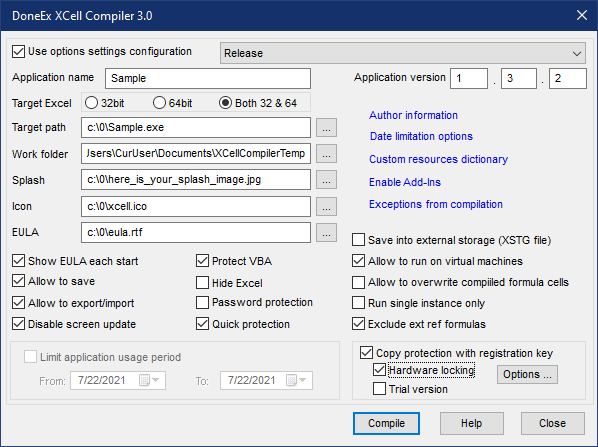
If you click the Options button, the new window will appear like the image below
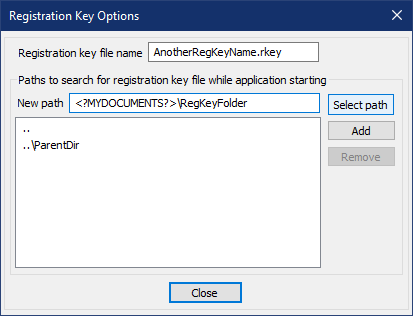
Registration key file name field allows you to change the regkey file name for compiled exe. After changing this field, compiled exe will try to find the registration key with only this name.
If this field will be empty, then registration key file name will be assigned by default as the name of exe file with “.rkey” extension.
Collection of search paths you can create by entering path manually into ‘New path’ field or by selecting appropriate path from Browse Folder dialog if you click on ‘Select path’ button. After entering path press “Add” button to add this path into collection of search paths.
You can enter as absolute path i.e. “C:\Program Files\DoneEx” as relative path i.e. “..\some folder” (“..” – means parent folder)
Relative path will be converted into full path relatively to compiled exe starting folder.
You can use template <?MYDOCUMENTS?> as the path to the regkey. This template will be substituted by the full path to the “MyDocuments” folder.
If you want to use “MySubFolderName” sub folder under “MyDocuments” folder then you need to enter the following path: <?MYDOCUMENTS?>\MySubFolderName
Please note that if the “Copy Protection With Registration Key” option is selected then the “Limit application usage period” option is inaccessible. The date limit can be set during the process of the regkey generation (see below). After compilation, the Sample.exe file in the target folder will be created.
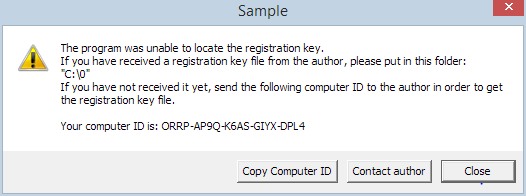
3. When you or your customer will try to start the Sample.exe file without a registration (activation) key, the ‘Registration key is not found’ message will appear, as shown below.
Let’s consider how to create a registration key for a copy-protected application.
4. Click the “Registration Key Tool” menu item via the following path: Excel main menu ‘DoneEx >> XCell Compiler >> Registration Key Tool’ .

Registration Key Tool window will be opened.
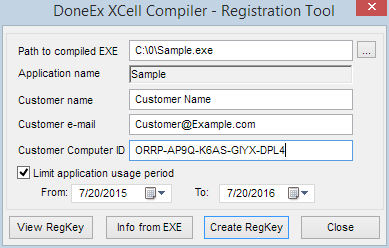
5. Fill out the fields as follows:
- The ‘Path to compiled Exe’ field. Browse until you find Sample.exe you’ve created in the previous steps.
- The ‘Application Name’ field is filled out automatically from the EXE file.
- Put the customer name and the customer email address into the corresponding fields of the form.
- Now the most important information is the computer id, please copy/type the computer id into the “Customer Computer ID” field.
- You can also put a date restriction on the registration file by checking on the ‘Limit application usage period’ option.
- When you click the ‘Create RegKey’ button, the Regkey Tool will create ‘sample.rkey’ (If you use your workbook with different name then the name of regkey will be: <name of your workbook>.rkey) in the same directory where your compiled file is located.
- You can send the generated regkey file to your customer, so that the compiled Sample.exe will run only on his/her computer.
With the steps above you can protect your excel application from being copied illegally from one computer to another.