How to create trial/demo version of protected workbook
You may create a trial version of your protected workbook with an adjustable trial period. The start date of the trial period will be set as the date of the first start of the compiled EXE on the client’s computer.
In order to create the trial/demo version of your workbook you need to select the following options in the compilation form.
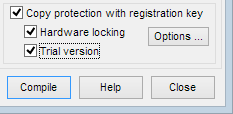
- Check the “Copy protection with registration key” option.
- Check the “Hardware locking” option if you would like to have your workbook locked to client’s computer id number after the trial period expires.
- Check the “Trial version” option.
When you enable the “Trial version” option, the “Trial Version Options” form will appear.
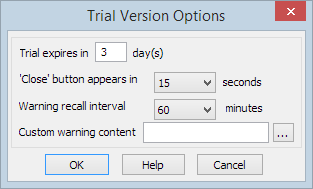
Here you may adjust additional options for your trial workbook.
- The number of days for the trial period can be adjusted in the ‘Trial expires in … days’ field.
- The amount of seconds for the delay time before ‘Close’ button appears on the trial warning window can be adjusted in the ‘ ‘Close’ button appears in … seconds’ field.
- By changing the ‘Warning recall interval’ time, you will set the interval time between the latest trial warning window appearance and when it will appear again. If you select 0 (zero) minutes, the trial warning window will appear on startup only.
- To customize the trial warning content you need to assign your own message by selecting the .TXT or .RTF file with content of your warning from your computer into the ‘ Custom warning content’ field.
When you are done adjusting the trial version option settings, press “OK” button to apply the changes.

A message warns you against opening the trial version of the EXE file before distribution, because otherwise it will not work as trial version.
Now you have the compiled EXE with the option to work in trial mode.
Let’s consider how this trial workbook will work on customer’s computer.
When the trial workbook starts, a customer will see the following trial version warning window (which will be shown at every time interval that you have designated in the ‘Warning recall interval’ field of the ‘Trial Version Options’ form before compilation).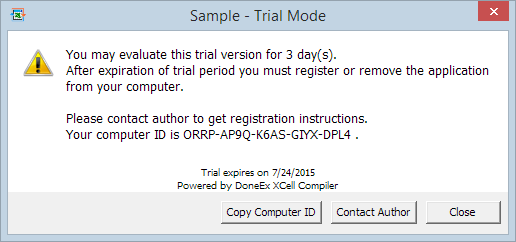
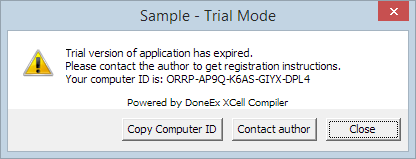
When the trial period expires, the following notice will appear.
“Save”, “Save As” and “Export” features are not available during trial period.
When your client makes a purchase, they will send you their computer id (if you compile the application with “Hardware locking” option on). You will create the registration key and the same EXE file will work in fully functional, registered mode. You do not need to generate another EXE.
When testing the trial workbook, you may start it on your machine as many times as you want.
But when you are ready to distribute it to a customer, you will need to recompile the trial application and you should not start it after that compilation, because the EXE will fix the date of the first start as a start date of the trial period.
How to assign your own limitations to the trial workbook.
This product feature provides a great opportunity to choose your own limitations for the trial-version of your workbook.
These limitations may even be applied to cell values of your choice. This allows you to decide the difference between what is seen in the trial version and what is seen in the registered version of the product.
For that purpose you need to use Excel function INFO.
The XCell Compiler adds new parameter values for that function which returns correct values in the compiled EXE only.
INFO(“isexe”) – returns #VALUE! in original xls and TRUE in compiled EXE.
All of the following parameters of the INFO function are available for BUSINESS PRO license only and return no error values if EXE was compiled with ‘Hardware locking’ option on.
INFO(“rname”) – returns #VALUE! in the original xls, but #N/A in the compiled EXE when working in trial mode and returns the registered name if EXE is registered with a registration key file.
INFO(“rmail”) – returns #VALUE! in the original xls, but #N/A in the compiled EXE when working in trial mode and returns the e-mail from the registration key if EXE is registered with a registration key file.
INFO(“compid”) – returns #VALUE! in the original xls, but the computer id number of the current computer where the compiled EXE is started.
This new INFO function’s parameters let you distinguish between a compiled and uncompiled, as well as between registered and trial version modes, of your workbook.
For example, consider the Excel formula:
=IF( ISERROR( INFO(“rname”)), IF( ISNA( INFO(“rname”) ), “Trial mode”, “Uncompiled mode”), IF( INFO(“rname”)=”admin”, “Admin Info”, “Customer info”))
A cell where this equation was entered, returns “Uncompiled mode” for the original xls, “Trial mode” for the compiled EXE in trial mode, “Admin info” for the registered user with name “admin” and “Customer Info” for all other registered users.