Excel workbook copy protection software – Excel Compiler
The DoneEx XCell Compiler is a powerful tool that ensures top-notch copy protection for Microsoft Excel workbooks.
By compiling your workbook into an executable application (EXE file), all your formulas are secured and converted into a binary format. This binary format ensures that the formulas cannot be restored back into the original Excel format, providing an additional layer of protection.
At the heart of the product is a formula calculation engine that we have developed ourselves. This engine replaces Excel’s own formula calculation engine and is the only way to provide the strongest protection for all formulas in a spreadsheet. While Microsoft Excel is still used for the formatting and displaying of the calculated results, our formula engine is responsible for the behind-the-scenes calculations, ensuring that your workbook’s formulas are kept secure.
In addition to protecting your formulas, the DoneEx XCell Compiler also offers reliable copy protection for your VBA code. Our software uses complex solutions, including making the VBA project unviewable, obfuscating the VBA code, and removing literals such as static string values and numbers from the VBA code. This level of protection means that your entire VBA project is securely protected from being copied through a simple ‘Compile’ button click.
The best part is that you don’t need to be a programmer or an Excel expert to use the DoneEx XCell Compiler. The product’s user-friendly interface makes it easy for anyone to compile their workbooks and protect them from unauthorized access or copying.
With the registration/license management feature, you can ensure that your workbook is only accessible on authorized computers. This is done through the use of a hardware locking mechanism, which prevents the workbook from being illegally copied from one computer to another.
Additionally, you have the ability to add your own splash screen image, icon, End User License Agreement (EULA), and more. This level of customization allows you to tailor the software to your specific needs and branding.
Overall, the DoneEx XCell Compiler is the ultimate solution for those who need to protect their Microsoft Excel workbooks. With its powerful formula calculation engine, robust VBA code protection, and user-friendly interface, this software is the ideal choice for anyone who wants to keep their work protected from unauthorized access and usage.
Try a free trial version of Excel Compiler! The trial version comes complete with all functional features for formula and VBA protection.
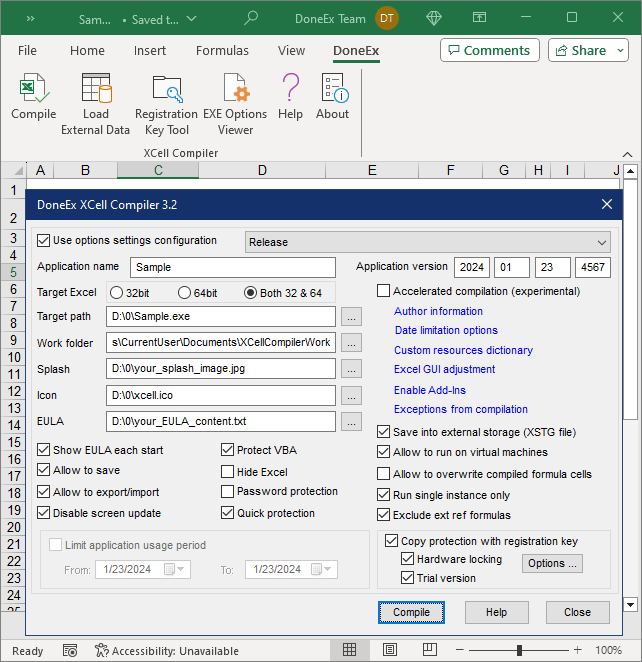
The most important benefits of using Excel Compiler software
Excel Compiler offers a range of features to protect and secure your Excel workbooks.
The main features include:
- Conversion of Excel formulas into binary format to prevent unauthorized access to them. This feature is essential for strong and effective copy protection of Excel files.
- Conversion of Excel workbooks (XLS, XLSX, XLSM, XLSB – aka Excel Binary Workbook) into EXE applications, which require Excel to run. With the product this can be done without any programming skills.
- Compatibility with both Microsoft Excel 32-bit and 64-bit versions.
- Strong VBA code protection to prevent unauthorized viewing, tracing, and copying of macros for advanced Excel users.
- Workbook copy protection with registration keys/licenses to prevent illegal copying and distribution.
- Hardware locking for anti-piracy protection, ensuring that the protected workbook only works on the authorized computers.
- Creation of trial/demo versions with limited functionality and customized warnings.
- Royalty-free distribution of compiled EXE files, without requiring pre-installed run-time libraries.
- Customizable run-time messages that can be localized to your customers’ language.
- Time-limited usage of the compiled Excel workbook, with the option to set a date for when the EXE stops working.
- Customizable license expiration warning, allowing you to add your own message to the compiled workbook.
- End User License Agreement (EULA) information that must be accepted by the end user before opening the workbook.
- Option to hide Microsoft Excel on start-up.
- Protection of Excel workbooks with dongles (USB sticks).
- Direct saving of changed data during work sessions into the compiled EXE or into separate .XSTG files.
- Import/export functionality for changed data and the ability to export all changes made during the life of the compiled EXE.
- Ability to run the compiled workbook without the Excel macro security alert.
- Customizable application information, including the name, version, author contact information and copyright.
- Addition of a customized splash screen image to display during workbook opening on the customer’s computer.
- Access restriction for authorized individuals and limitation of user activities to only what is necessary for business purposes.