Workbook date limitation options
You can set the date limitation for the compiled workbook in the following ways:
- On the compilation form, as date limitation for the compiled EXE.
- Through the registration key tool, as date limitation on the registration key of the EXE file when compiled with copy protection.
- When you compile the EXE file as a trial version.
The workbook date limitation options form contains settings which affect the compiled EXE behavior, if it contains date limitations.
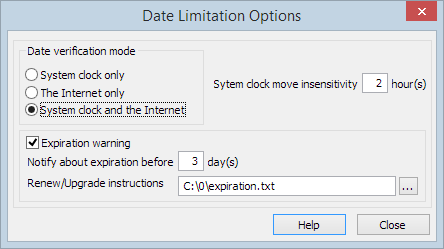
Date Verification Mode Options Group for Workbook Date Limitation
Date verification mode presents 3 options which define the way the compiled application will verify the current date on an application start.
- System clock only. With this option the compiled exe will verify the current date using the system clock. If it is incorrect, the application displays the error message “System clock has been set back” and the exe will not start.
- Internet only. With this option the compiled exe will check the current date on the Internet by making a request to public NTP servers. If there is no connection to the Internet then the application shows the error “Application requires the Internet connection to start” and will not start.
- System clock and the Internet. With this verifying mode the compiled exe will check the system clock settings. If it is incorrect, the application will try to verify the current date through the Internet. If there is no Internet connection, the application displays the message: “System clock has been set back and the Internet connection is not available. Application cannot start.” and will not start.
System Clock Move Insensitivity Setting
Use this option when you select the “System clock only” or the “System clock and the Internet” date verification modes.
Sometimes the system clock ends up moving back unintentionally. For example, when automatic daylight savings time changes happen or when customer is traveling through several time zones. To prevent blocking the compiled application’s launch you may set the date verification sensitivity to the system clock changes. You need to enter the amount of hours which will not affect the compiled application launch. In other words, if the system clock was moved back an amount of time equal to or less than this option, then the date verification will function normally.
Expiration Warning
You may set an expiration warning message. The compiled file displays this message at the specified amount of days before the application expires. You may enter the path to the file that contains your expiration warning message in the “Renew/Upgrade instructions” field.