XCell Compiler

  • Product
    • Home
    • News
    • Options Overview
    • Features By Licenses
    • Excel Formula Protection
    • Workbook Copy Protection
    • VBA Copy Protection
    • Custom Message Content
    • Bulk Registration Key Generator
    • EULA
  • Q&A
    • Install and Uninstall
    • Questions about trial version
    • Technical
    • Troubleshooting
    • Buying product
    • Updates
  • How-To
    • Compile workbook to EXE file
    • Create registration key for compiled workbook
    • Create protected trial/demo workbook
    • Compile EXE for Excel 32 and 64 bit
    • Hide Excel on start
    • Keep compilaton options settings
    • Export/Import changed data
    • Set date limitation for workbook
    • Translate or change default messages
    • Runtime API References
    • Protect workbook with dongle
    • Compile Time Troubleshooting
  • Download
  • Order
  • Testimonials
  • Contact Us

How to select the target Excel bitness

Since MS Office 2010 Excel, Excel provides two different bitness options – 32-bit and 64-bit.
When you compile your workbook, you need to define which Excel will be able to work with your compiled workbook.
To find the bitness of Microsoft Excel you need to follow the path: Microsoft Excel main menu >> File >> Account >> About Excel.

If you select the 32-bit ‘Target Excel’ option, then the compiled EXE will only be able to run on a computer with Excel 32-bit.
If you select the 64-bit ‘Target Excel’ option, then the compiled EXE will only be able to run on a computer with Excel 64-bit.

It does not matter what bitness of Windows OS the computer has, the only the important thing is the bitness of Excel which is installed on the computer where the compiled exe is being started.

The ‘Both 32 & 64’ bit ‘Target Excel’ option allows you to create an EXE file which will be indifferent to the Excel bitness on customer computer; the compiled EXE will be able to start with Excel 32-bit just as with Excel 64-bit.
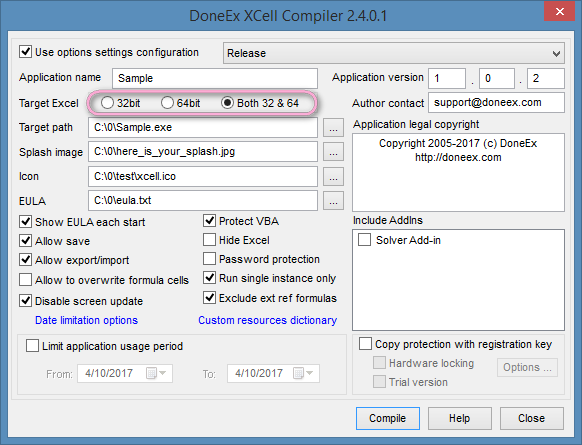
 

XCell Compiler form with target Excel bitness options highlighted
However, the ‘Target Excel Both 32 & 64’ option may not work for some workbooks. If workbook uses VBA code with #if/#else/#endif directives then compilation may fail.

If you select ‘Target Excel Both 32 & 64’ and your workbook compilation fails or your workbook does not work as expected after compilation, then you need to compile separate EXE files for 32 and 64-bit target Excel by selecting only 32-bit or 64-bit respectively.

If you do not know what Excel bitness your client has, then you need to provide the EXE file compiled with ‘Both 32 & 64’ or deliver both versions of your EXE file—for Excel 32-bit and for Excel 64-bit—to your client.
Cross compiling is supported, so you may compile a 64-bit EXE from a 32-bit Excel and vice versa.


VBA Compiler Available

DoneEx Vba Compiler for Excel
  • XCell Compiler
    • News
    • Options Overview
    • Features by licenses
    • Excel Formulas Protection
    • Workbook Copy Protection
    • VBA code copy protection
    • Custom Message Content
    • Bulk RegKey Generator
    • Privacy Policy
    • EULA
  • How-To
    • Compile workbook to EXE
    • Use registration key tool
    • Create trial/demo workbook
    • Select target Excel bitness
    • Hide Excel on start
    • Options settings configuration
    • Export/import changed data
    • Date limitation options
    • Translate messages
    • Runtime API References
    • Protect workbook with dongle
    • Compile Time Troubleshooting
Copyright 2005-2022 © DoneEx LLC. All Rights Reserved.